|
|
|
|
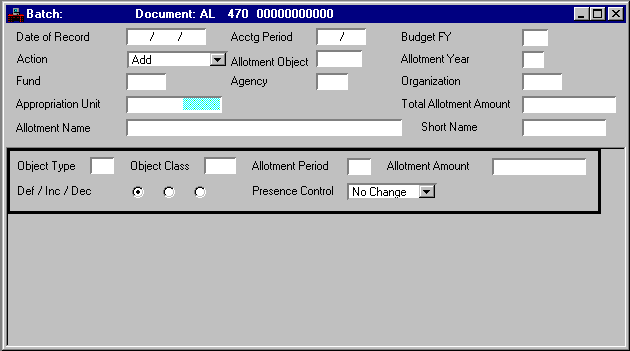
Date of Record
|
Default is the date the document is accepted. Enter the date (
mm dd yy
) that you want to associate with this document, usually the current date.
|
|
Acctg Period
|
Default is the accounting period associated with the
Date of Record
. If you want this entry recorded in a different accounting period, you must enter an open period (
mm yy
). You cannot enter a future accounting period.
|
|
Budget FY
|
Required. Enter the last two digits of the desired open fiscal year.
|
|
New/Reactivate/Modify [Action]
|
Default is
Add [A]
. Valid values are:
Add [A]
Indicates a new allotment period or reactivates an allotment.
Modify [C]
Modifies appropriation period or appropriation amounts.
|
|
Allotment Object
|
Enter the allotment object code. See Budget Object (BOBJ) table for valid values.
|
|
Allotment Year
|
Required. Enter the allotment year. You cannot use an allotment year that is prior to the budget fiscal year.
|
|
Fund
|
Required. Enter the fund for the allotment. If you are modifying an allotment, this field must match the fund on the original allotment. See Fund Index (FUND) for valid values.
|
|
Agency
|
Required. Enter the agency for the allotment. If you are modifying an allotment, this field must match the agency on the original allotment. See Agency Index (AGCY) for valid values.
|
|
Organization
|
Conditional. Required if
Allotment Organization Option
is
Required on Budget and Accounting [Y]
on Fund Agency (FGY2); otherwise, leave blank. Enter the organization for the appropriation. If you are modifying an allotment, this field must match the organization on the original allotment. See Organization Index (ORGN) for valid values.
|
|
Appropriation Unit
|
Required. Enter an Appropriation Program and Allotment Program. See Program Reference Alternate Table (PRFA) for valid values.
|
|
Total Allotment Amount
|
Required. Enter the total of the amount column; this is a net amount. Do not enter cents.
|
|
Allotment Name
|
Optional. Enter the description of the allotment as you want it to appear on reports. If you enter a new name for a previously defined code, the system adopts the new name.
|
|
Short Name
|
Optional. Enter the name that you want to appear on the reports when not enough space is available for the full name. If you enter a name for a previously defined code, the system adopts the new name.
|
|
Object Type
|
Enter the allotment object type code. See Object Type (OTYP) for valid values.
|
|
Object Class
|
Enter the allotment object class code. See Object Class (OCLS) for valid values.
|
|
Allotment Period
|
Required. Enter a valid allotment period.
|
|
Allotment Amount
|
Conditional. If adding a new allotment, enter the full amount of the allotment. If modifying a previously entered allotment, enter the amount of increase or decrease.
If
Allotment Control Option
is
Full [C]
on Fund (FUN2), the amount entered in this field cannot be less than the amount already obligated against this unit of appropriation. Enter amounts in whole dollars.
|
|
Def/Inc/Dec
|
Default is
Default [blank]
. If adding or changing allotment lines, select
Increase [I]
or
Decrease [D]
.
|
|
Presence Control
|
Default is No Change [blank]. Select
Yes
[
Y
] for presense control to prevail over full or cumulative control when available. Indicate
No
[
N
] for Fund Allotment Control to prevail.
|
|
|
|
|
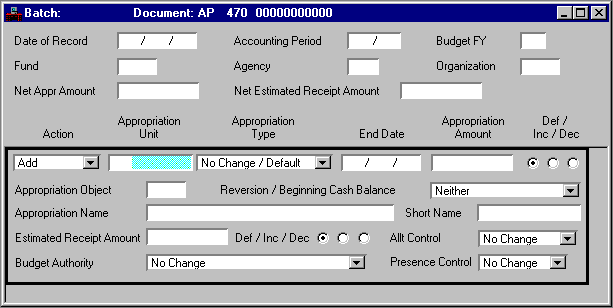
Date of Record
|
Default is the date the document is accepted. Enter the date (
mm dd yy
) that you want to associate with this document, usually the current date.
|
|
Accounting Period
|
Default is inferred from
Date of Record
. If you want this entry recorded in a different accounting period, you must enter an open period (
mm yy
). You cannot enter a future accounting period.
|
|
Budget FY
|
Required. Enter the last two digits of the desired open fiscal year.
|
|
Fund
|
Required. Enter the fund for the appropriation. See Fund Index (FUND) for valid values.
|
|
Agency
|
Required. Enter the agency for the appropriation. See Agency Index (AGCY) for valid values.
|
|
Organization
|
Optional. Required if
Appropriation Organization Option
is
Required on Budget and Accounting [Y]
on Fund Agency (FGY2); otherwise, leave blank. Enter the organization for the appropriation. Refer to Organization Index (ORGN) for valid values.
|
|
Net Appr Amount
|
Conditional. Required if adding or modifying appropriation lines. Enter the total of each of the amounts columns. Do not enter cents.
|
|
Net Estimated Receipt Amount
|
Conditional. Required if adding or modifying receipt amounts. Enter the total of each of the amounts columns. Do not enter cents.
|
|
Action
|
Default is
Add [A]
. Valid values are:
Add [A]
Adds a new appropriation to your system, or re-activates an inactive unit of appropriation.
Modify [C]
Modifies the appropriation period or the appropriation amounts.
Deactivate [D]
Deactivates a unit of appropriation (you cannot process any additional obligations against the appropriation). Inactive lines are deleted from next year's budget by the new year initialization program.
|
|
Appropriation Unit
|
Required. Enter an Appropriation Program code. See Program Reference Alternate Table (PRFA) for valid values.
|
|
Appropriation Type
|
Default is
Regular [01]
. Valid values are:
Regular [01]
,
Continuing [02]
,
Supplemental [03]
, and
Special [04]
.
|
|
End Date
|
Default is the date that the fiscal year ends. Required if the date that the appropriation ends is other than the end of the fiscal year. You cannot spend the funds in this appropriation after this date.
|
|
Appropriation Amount
|
Conditional. Required if adding or changing appropriation amounts. When adding an appropriation, enter the original appropriation amount in this field. When changing an appropriation, enter the revised appropriation amount in this field.
If
Appropriation Control Option
is
C
(full control) on Fund Index (FUND), you cannot enter a revised appropriation amount for a change that is less than the amount already obligated against this appropriation. Do not enter cents; round to the nearest whole number.
|
|
Def/Inc/Dec
|
Default is
Default [blank]
. Required if
Appropriation Amount
is modified. Valid values are
Increase [I]
or
Decrease [D]
.
|
|
Appropriation Object
|
Enter the appropriation object code. Entry will be validated against the Budget Object (BOBJ) table when processed.
|
|
Reversion/Beginning Cash Balance
|
Conditional. Default is
Neither [blank]
. Required if
Appropriation Amount
represents a reversion of funds or an adjustment to beginning cash balance; otherwise, select
Neither [blank]
. Valid values are:
Reversion [R]
Reverts the amount.
Beginning Cash Balance [B]
Indicates the amount is used to update the appropriation's beginning cash balance.
|
|
Appropriation Name
|
Optional. Enter the description of the appropriation as you want it to appear on reports. If you enter a new name for a previously defined code, the system adopts the new name.
|
|
Short Name
|
Optional. Enter the name that you want to appear on the reports when not enough space is available for the full name. If you enter a name for a previously defined code, the system adopts the new name.
|
|
Estimated Receipt Amount
|
Optional. Enter an estimated receipt amount.
|
|
Def/Inc/Dec
|
Default is
Default [blank]
. Required if
Estimated Receipt Amount
is modified. Valid values are
Increase [I]
or
Decrease [D]
.
|
|
Allt Control
|
Default is No Change. Indicate how allotment program budgets will be controlled by selecting Object Type, Object Class, or Neither
|
|
Budget Authority
|
Default is
Appropriation Only [N]
. Required if you want to include estimated or actual receipts in the calculation of budget authority. Valid values are:
Appropriation Only [N]
The spending limit is the current modified appropriation amount, as it exists on Appropriation Inquiry (Extended) (EAP2).
Actual Receipts [A]
The spending limit is the appropriation amount plus the actual receipts received against the appropriation.
Estimated Receipts [E]
The spending limit is the appropriation amount plus the estimated receipts received against the appropriation.
Greater of Actual or Estimated Receipts [G]
The spending limit is the appropriation amount plus the greater of the actual or estimated receipts.
Lesser of Actual or Estimated Receipts [L]
The spending limit is the appropriation amount plus the lesser of the actual or estimated receipts.
|
|
Presence Control
|
Default is No Change [blank]. Select
Yes
[
Y
] for presense control to prevail over full control when available. Indicate
No
[
N
] for Fund Appropriation Control to prevail.
|
|
|
|
|
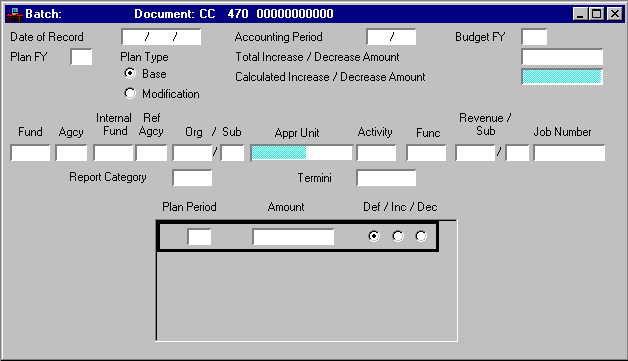
Date of Record
|
Default uses the date it accepts the document. Enter the date (
mm dd yy
) that you want to associate with this document, usually the current date.
|
|
Accounting Period
|
Default is inferred from
Date of Record
. If you want this document recorded in another accounting period, enter the open desired period (
mm yy
). You cannot enter a future period.
|
|
Budget FY
|
Required. Enter the last two digits of the fiscal year to which this document applies.
|
|
Plan FY
|
Default is inferred from
Budget Fiscal Year
. Enter the plan fiscal year. The plan year is never less than the budget fiscal year.
|
|
Plan Type
|
Optional. Select the appropriate value depending on which plan type you are creating, adding to, or changing. Valid values are
Base [B]
and
Modification [M]
. All changes made to the base plan are reflected in the modified (current) plan.
|
|
Total Increase/Decrease Amount
|
Required. Enter the unsigned total of the increase/decrease amount column.
|
|
Calculated Increase/ Decrease Amount
|
Display only. This field is calculated by the system and displays the total of all line amounts.
|
|
Fund
|
Required. Default is inferred from Organization (ORG2) based on the agency and organization entered on this document.
|
|
Agency
|
Required. Enter the agency for which this document applies (the buyer if internal). See Agency Index (AGCY) and Fund Agency Index (FAGY) for valid values. If you are modifying a previous entry, this field must match the agency originally entered.
|
|
Internal Ref Fund, Agency
|
Conditional. Required if planning for internal purchases and sales. Enter the fund and agency of the seller. See Agency Index (AGCY) and Fund Agency Index (FAGY) for valid values in both the planning and the budget fiscal years. If you are modifying a previous entry, these fields must match the fields originally entered.
|
|
Org/Sub
|
Optional. Refer to Organization Index (ORGN) and Sub-Organization (SORG) for valid values.
|
|
Appr Unit
|
Required if
Appropriation Control Option
is
C
(full control) or
P
(presence control) on Fund Index (FUND). Also required when the transaction is entered with a closed budget fiscal year. The appropriation must be open and must be applicable to the budget fiscal year entered for the transaction. See Appropriation Inquiry (Extended) (EAP2) for valid values.
|
|
Activity
|
Default is inferred from Organization (ORG2). If you want to override the value on Organization (ORG2), enter a valid activity from Activity Index (ACTV).
|
|
Function
|
Conditional. Default is inferred from Organization (ORG2); or from Activity (ACT2), if a function code is not entered in Organization (ORG2). Refer to Function (FUNC) for valid values.
|
|
Revenue/Sub
|
Optional. Refer to Revenue Source Index (RSRC) and Sub-Revenue Source (SREV) for valid values.
|
|
Job Number
|
Optional. If
Job Cost
is
Yes [Y]
on System Control Options (SOP2), enter a job number. See Job Index (JOBT) for valid values. If
Job Cost
is
No [N]
on System Control Options (SOP2), enter a project number. If your system does not include job cost or project accounting, enter a general code.
|
|
Report Category
|
Optional. Refer to Reporting Category (RCAT) for valid values. Ensure the reporting category is valid within the agency.
|
|
Termini
|
Conditional. Required if Termini Validation Indicator is selected on Agency Project (AGPR) for this project. Enter the mile point, range of mile points, or bridge identifier at which work is performed for a given Highway Route. See Termini Reference Table (TERM) for valid values.
|
|
Plan Period
|
Required. Enter the two-digit period that this line represents. Valid values depend on the value of
Plan Frequency
on Fund Agency Index (FAGY). Valid values are:
01
Enter this value if
Plan Frequency
is
Y
(yearly).
01, 02, 03 or 04/1, 2, 3, or 4
Enter this value if
Plan Frequency
is
Q
(quarterly).
01...13/1...13
Enter this value if
Plan Frequency
is
M
(monthly).
|
|
Amount
|
Required. Enter the unsigned amount of change being made to the plan. If you are establishing a new line, this is the original amount of this line. Enter amounts in whole dollars.
|
|
Def/Inc/Dec
|
Defaults to
Def [blank]
. Required if making changes to existing lines. Valid values are
Inc [I]
and
Dec [D]
.
|
|
|
|
|
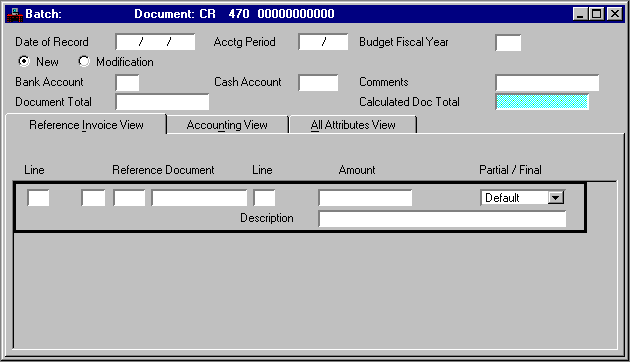
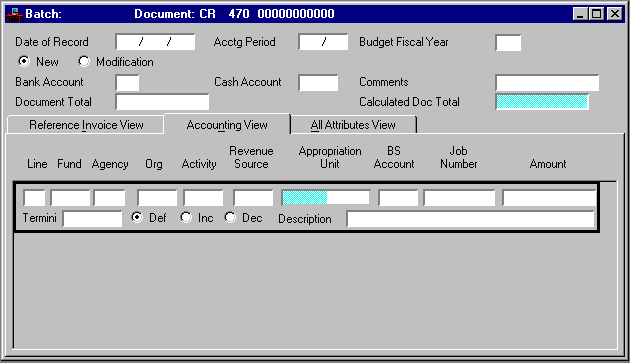
Date of Record
|
Default is the date the document is accepted. Enter the date (
mm dd yy
) that you want to associate with this document, usually the current date.
|
|
Acctg Period
|
Default is inferred from
Date of Record
. If you want this document recorded in another accounting period, enter the open, desired period (
mm yy
). You cannot enter future periods.
|
|
Budget Fiscal Year
|
Default is inferred from
Date of Record
. If you want this document recorded in another fiscal year, enter the desired, open fiscal year. You cannot enter future budget fiscal years.
|
|
New/Modification [Action]
|
Default is
New [E]
. Valid values are:
New [E]
This is a new document.
Modification [M]
This document is modifying a previously accepted document. This allows you to add lines to a previous document, change the amounts on existing lines (not codes), or cancel a line (decrease a line amount to zero). To change codes in an existing line, you must cancel that line and reenter a new line. You can recorded both these lines on the same document by selecting
Modification [M]
.
|
|
Bank Account
|
Required. All lines recorded on a cash receipt must be deposited to the same bank account. See Bank Account (BANK) for valid values.
|
|
Cash Account
|
Default offset cash accounts are inferred from Bank Account (BANK). Enter an offset cash account if:
The system does not use the default offset cash account on Bank Account (BANK).
You want to override the account recorded on Bank Account (BANK). The offset cash account code represents the account debited as a result of this document.
If you enter an account code, you are overriding the offset cash account for
all
lines on the document.
|
|
Comments
|
Optional. Enter a descriptive note.
|
|
Document Total
|
Required. Enter the unsigned net amount of all lines on the document. To compute this amount:
1. Add all the increase amounts,
2. Add all the decrease amounts, and
3. Subtract the smaller of these amounts from the larger and enter that amount.
|
|
Calculated Doc Total
|
Display only. This amount is system-computed and displays the total of the line amount.
|
|
|
|
|
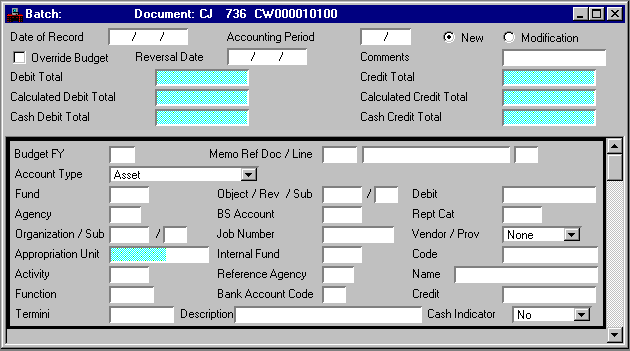
Fund
|
Required. Default is inferred from Organization (ORG2) based on the agency and organization entered on this document. See the Fund Index (FUND) for valid values.
|
|
Agency
|
Required. Enter the agency receiving the revenue. Refer to Agency Index (AGCY) and Fund Agency Index (FAGY) for valid values.
|
|
Org
|
Conditional.
Organization
is required on revenue documents if
Revenue Budget Organization Option
is
Y
(required on budget and accounting) on Fund Agency Index (FAGY) for this line's fund/agency combination. If this line is a vendor refund, it is controlled by
Expense Budget Organization Option
on Fund Agency Index (FAGY).
Otherwise, this field is optional and used for reporting purposes only. Refer to Organization Index (ORGN) for valid values.
|
|
Activity
|
Conditional. Required on revenue documents if
Revenue Budget Activity Option
is
Y
(required on budget and accounting) or
A
(required on accounting) on Fund Agency Index (FAGY). If this line is a vendor refund, it is controlled by
Expense Budget Activity Option
on Fund Agency Index (FAGY). See Activity Index (ACTV) for valid values.
|
|
Revenue Source
|
Conditional. Required on all documents except balance sheet documents and vendor refunds. On balance sheet documents, enter the balance sheet account or the object on vendor refunds. Refer to Revenue Source Index (RSRC) for valid values.
|
|
Appropriation Unit
|
Required. Enter the Program Budget Unit element for the items listed on this voucher. See Program Reference Table (PRFT) for valid values. The Appropriation Program element and Allotment Program element will be inferred from PRFT based on Program Budget Unit.
|
|
BS Account
|
Conditional. Required if this line is a balance sheet document. Enter a deferred revenue account if the line is recording a cash advance. If this account is a type 23, ensure that it is a non-cash asset account. See Balance Sheet Account Index (BACC) for valid values.
|
|
Job Number
|
Conditional. Organizations and activities can be defined to require the entry of a job number. Refer to Organization (ORG2) or Activity (ACT2) for details.
Otherwise, this field is optional. If
Job Cost
is
Yes [Y]
on System Control Options (SOP2), enter a job number. See Job Index (JOBT) for valid values. If
Job Cost
is
No [N]
on System Control Options (SOP2), enter a project number or general reporting category.
|
|
Termini
|
Conditional. Required if Termini Validation Indicator is selected on Agency Project (AGPR) for this project. Enter the mile point, range of mile points, or bridge identifier at which work is performed for a given Highway Route. See Termini Reference Table (TERM) for valid values.
|
|
Def/Inc/Dec
|
Default is
Default [blank]
. Required if modifying a line. Valid values are
Decrease [D]
and
Increase [I]
.
|
|
|
|
|
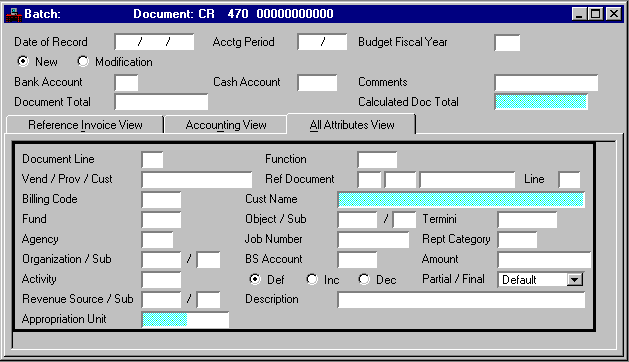
Vend/Prov/Cust
|
Conditional. Required if cash is applied to a customer account. Enter the customer from whom you are receiving payment. If a receivable is referenced, this field is inferred from the Receivable (RE) document. Refer to Customer (CUST) for valid values.
Required on vendor refunds if
Vendor Control Option
on System Control Options (SOPT) is
Yes [Y]
. See Vendor Index (VEND) for valid values.
|
|
Billing Code
|
Conditional. Required if cash is being applied to a customer account. Enter the billing code that identifies the billing profile for the customer account application. Refer to Billing Profile (BPRO) for valid values.
|
|
Sub-Organization
|
Conditional. Required on vendor refunds if
Sub-Organization Required on Spending
on Organization (ORG2) is
Required [Y]
, or
Required on Expenditure Transactions [3]
.
Required on revenue documents if
Sub-Organization Required on Revenue
on Organization (ORG2) is
Required [Y]
. Otherwise, this field is optional. Refer to Sub-Organization (SORG) for valid values. You must enter an organization before you can enter a sub-organization.
|
|
Sub-Revenue Source
|
Conditional.
Sub-Revenue Source
is required if
Sub-Revenue Source Required
on Revenue Source (RSR2) is
Yes [Y]
for the revenue source used. Otherwise, this field is optional. Refer to Revenue Source Index (RSRC) for valid values. You must enter a revenue source before you can enter a sub-revenue source.
|
|
Function
|
Conditional. Default is inferred from Organization (ORG2); or from Activity (ACT2), if a function code is not entered in Organization (ORG2). If this line is a vendor refund, it is controlled by
Expense Budget Function Option
on Fund Agency Index (FAGY). Refer to Function (FUNC) for valid values.
|
|
Cust Name
|
Display only. This value corresponds with
Vendor/Provider/Customer
. If a vendor code is entered, then the corresponding vendor name is displayed.
|
|
Object/Sub
|
Conditional.
Object
is required on vendor refunds. Otherwise, this field is blank. Refer to Object Index (OBJT) for valid values.
Sub-Object
is required on vendor refunds if
Sub-Object Required
is selected [
Y
] on Expense Budget Inquiry (Extended) (EEX2). Otherwise, this field is optional on vendor refunds. This field should be blank when object is not entered. Refer to Sub-Object (SOBJ) for valid values.
|
|
Rept Category
|
Conditional. Required on vendor refunds if
Reporting Category
on Agency (AGC2) is
Required on Expenditure Transactions [3]
. Required on revenue documents if
Reporting Category Required on Revenue Transaction
is
Yes [Y]
on Agency (AGC2).
Required on balance sheet documents if
Reporting Category Option
on Balance Sheet Account Index (BACC) is
Y
(required on documents) for the balance sheet account entered. Otherwise, this field is optional. Refer to Reporting Category (RPTG) for valid values.
|
|
|
|
|
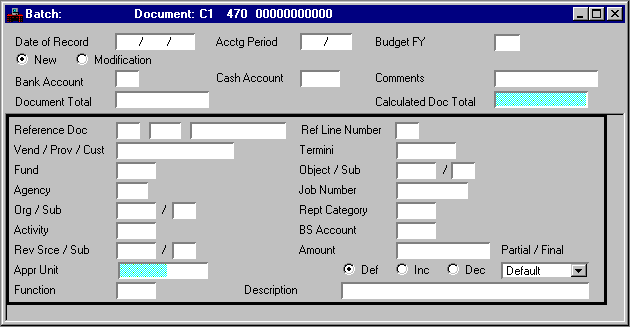
Date of Record
|
Default is the date the document is accepted. Enter the date (
mm dd yy
) that you want to associate with this document, usually the current date.
|
|
Acctg Period
|
Default is inferred from
Date of Record
. If you want this document recorded in another accounting period, enter the open, desired period (
mm yy
). You cannot enter future periods.
|
|
Budget FY
|
Default is inferred from
Budget Fiscal Year
. If you want this document recorded in some other fiscal year, enter the desired, open fiscal year. You cannot enter future budget fiscal years.
|
|
New/Modification [Action]
|
Default is
New [E]
. Valid values are:
New [E]
Indicates that this is a new document.
Modification [M]
Indicates that this document is modifying a previously accepted document. This allows you to add lines to a previous document, change the amounts on existing lines (not codes), or cancel a line (decrease a line amount to zero). To change codes in an existing line, you must cancel that line and reenter a new line. You can recorded both these lines on the same document by selecting
Modification [M]
.
|
|
Bank Account
|
Required. All lines recorded on a cash receipt must be deposited to the same bank account. See Bank Account (BANK) for valid values.
|
|
Cash Account
|
Default offset cash accounts are inferred from Bank Account (BANK). Enter an offset cash account if:
The system does not use the default offset cash account in Bank Account (BANK).
You want to override the account recorded in Bank Account (BANK). The offset cash account code represents the account debited as a result of this document.
If you enter an account code, you are overriding the offset cash account for
all
lines on the document.
|
|
Comments
|
Optional. Enter a descriptive note.
|
|
Document Total
|
Required. Enter the unsigned net amount of all lines on the document. To compute this amount:
1. Add all the increase amounts,
2. Add all the decrease amounts,
3. Subtract the smaller of these amounts from the larger, and enter that amount.
|
|
Calculated Doc Total
|
Display only. This amount is system-computed and displays the total of the line amount.
|
|
Reference Doc
|
Conditional. It is required for revenue documents and vendor refunds. Also required for balance sheet documents if
Reporting Category
is entered. Enter the transaction code, agency and number of the referenced Receivable (RE) document to which the cash will be applied.
|
|
Ref Line Number
|
Optional. Enter a unique number for each document line.
|
|
Vend/Prov/Cust
|
Conditional. Required on vendor refunds if
Vendor Control Option
on System Control Options (SOPT) is
Yes [Y]
. Refer to Vendor (VEN2) for valid vendor codes. If the
Advanced Receivables Option
on System Control Options (SOP2) is
Yes [Y]
. Refer to the Customer Information (CUST) or Provider (PROV) table for valid values.
|
|
Fund
|
Required. Default is inferred from Organization (ORG2) based on the agency and organization entered on this document. Enter the fund receiving the revenue. Refer to Fund Index (FUND) for valid values.
|
|
Agency
|
Required. Enter the agency receiving the revenue. Refer to Agency Index (AGCY) and Fund Agency Index (FAGY) for valid values.
|
|
Org/Sub
|
Conditional.
Organization
is required on revenue documents if
Revenue Budget Organization Option
is
Y
(required on budget and accounting) on Fund Agency Index (FAGY) for this line's fund/agency combination. If this line is a vendor refund, it is controlled by the
Expense Budget Organization Option
on Fund Agency Index (FAGY). Refer to Organization Index (ORGN) for valid values.
Sub-Organization
is controlled by the
Sub- Organization Required on Spending
option or the
Sub- Organization Required on Revenue
option on Organization (ORG2). Otherwise, this field is optional and used for reporting purposes only. Refer to Sub-Organization (SORG) for valid values. You must enter an organization before you can enter a sub- organization.
|
|
Activity
|
Conditional. Required on revenue documents if
Revenue Budget Activity Option
is
Y
(required on budget and accounting) or
A
(required on accounting) on Fund Agency Index (FAGY). If this line is a vendor refund, it is controlled by
Expense Budget Activity Option
on Fund Agency Index (FAGY). Enter a valid activity from Activity Index (ACTV).
|
|
Rev Srce/Sub
|
Conditional.
Revenue Source
is required on all documents except balance sheet documents or vendor refunds. Refer to Revenue Source Index (RSRC) for valid values.
Sub-Revenue
is required if
Sub-Revenue Source Required
on Revenue Source (RSR2) is
Yes [Y]
for the revenue source used. Otherwise, this field is optional. Refer to Revenue Source Index (RSRC) for valid values. You must enter a revenue source before you can enter a sub-revenue source.
|
|
Appr Unit
|
Required. Enter the Program Budget Unit element for the items listed on this voucher. See Program Reference Table (PRFT) for valid values. The Appropriation Program element and Allotment Program element will be inferred from PRFT based on Program Budget Unit.
|
|
Function
|
Conditional. Default is inferred from Organization (ORG2); or from Activity (ACT2), if a function code is not entered on Organization (ORG2). Required on revenue documents if
Revenue Budget Function Option
is
Y
(required on budget and accounting) or
A
(required on accounting) on Fund Agency Index (FAGY). If this line is a vendor refund, it is controlled by
Expense Budget Function Option
on Fund Agency Index (FAGY). Refer to Function (FUNC) for valid values.
|
|
Termini
|
Conditional. Required if Termini Validation Indicator is selected on Agency Project (AGPR) for this project. Enter the mile point, range of mile points, or bridge identifier at which work is performed for a given Highway Route. See Termini Reference Table (TERM) for valid values.
|
|
Object/Sub
|
Conditional.
Object
is required on vendor refunds. Otherwise, leave this field blank. Refer to Object Index (OBJT) for valid values.
Sub-Object
is required on vendor refunds if the
Sub-Object Required
is selected [
Y
] on Expense Budget Inquiry (Extended) (EEX2). Otherwise, this field is optional on vendor refunds. This field should be blank when object is not entered. Refer to Sub-Object (SOBJ) for valid values.
|
|
Job Number
|
Conditional. Organizations and activities can be defined to require the entry of a job number. Refer to Organization (ORG2) or Activity (ACT2) for details.
Otherwise, this field is optional. If
Job Cost
is
Yes [Y]
on System Control Options (SOP2), enter a job number. See Job Index (JOBT) for valid values. If
Job Cost
is
No [N]
on System Control Options (SOP2), enter a project number or general reporting category.
|
|
Rept Category
|
Conditional. Required on vendor refunds if
Reporting Category
on Agency (AGC2) is:
Required [Y]
or
Required on Expenditure Transactions [3]
. Required on revenue documents if
Reporting Category Required on Revenue Transaction
is
Yes [Y]
on Agency (AGC2). Required on balance sheet documents if
Reporting Category
on Balance Sheet Account (BAC2) is
Required on Documents [Y]
for the balance sheet account entered.
Otherwise, this field is optional. Refer to Reporting Category (RPTG) for valid values.
|
|
BS Account
|
Conditional. Required if this line is a balance sheet document. Enter a deferred revenue account if the line is recording a cash advance. If this account is a type 23, ensure that it is a non-cash asset account. See Balance Sheet Account Index (BACC) for valid values.
|
|
Amount
|
Required. If this is a new line, enter the dollar amount of the item(s) described on this line. If this line is a modification to a previous line, enter the amount of the change over (under) the previous amount. The decimal point is optional, but you must enter two digits for cents.
|
|
Def/Inc/Dec
|
Default is
Default [blank]
. Required if modifying
Amount
. Valid values are
Decrease [D]
and
Increase [I]
.
|
|
Partial/Final
|
This field is automatically set using the short and overpayment tolerances from Revenue Option by Agency and Revenue Source (ROAR) if agencies have set up ROAR. Otherwise, this field is set using the short and overpayment tolerances from Revenue Options (ROPT).
|
|
Description
|
Optional. Enter a descriptive note.
|
|
|
|
|
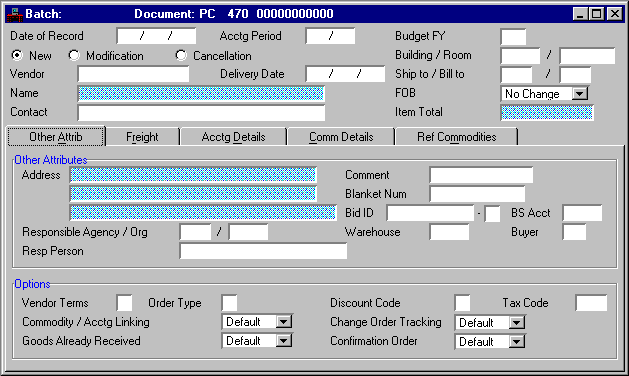
Date of Record
|
Defaults to date that the system accepts the document. Enter the date (
mm dd yy
) that you want to associate with the transactions, usually the current date. Future dates are not valid.
|
|
Acctg Period
|
Default is inferred from
Date of Record
. If you want this transaction recorded in another accounting period, enter the desired open period (
mm yy
). The only valid future period is the first period of the future year.
|
|
Budget FY
|
Default is the current fiscal year. If you want this transaction recorded in another budget year, enter the desired open year.
|
|
New/Modification/Cancellation [Action]
|
Defaults to
New [E]
. Valid values are:
New [E]
This is a new document (new entry).
Modification [M]
This document is modifying a previously entered document.
Modification [M]
allows you to add lines, change the amounts of existing lines (but not the codes), or cancel a line (decrease a line amount to zero). On a modification transaction, all codes must match the original document.
Cancellation [X]
This document is canceling an existing document. You cannot have referenced the document you want canceled in any way; for example, a Receiver (RC) or Vendor Invoice (VI).
-
To change codes for an existing line, you must cancel the existing line and enter a new line. You can record both these lines on the same document by selecting
Modification [M]
.
|
|
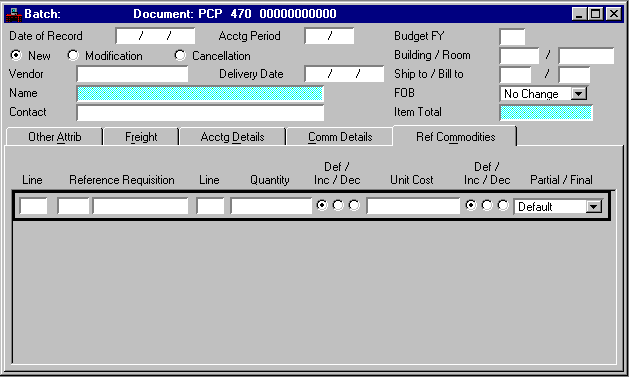
Building/Room
|
Optional
. Enter the building and room number to which the order is delivered.
|
|
Vendor
|
Required. Enter the vendor with whom this purchase order is placed. You cannot enter a miscellaneous vendor on this document. See Vendor Index (VEND) for valid values.
|
|
Delivery Date
|
Default is the current date. Enter the date (
mm dd yy)
when you must receive the order.
|
|
Ship to/Bill to
|
Ship to
is required. Enter the code that represents the receiving location. See Shipping Address (SHIP) for valid values.
Bill to
is required. Enter the code that represents the billing location. See Billing Address (BILL) for valid values.
|
|
Name
|
Display only. The name of the vendor is inferred from Vendor (VEN2).
|
|
FOB
|
Required. Select
Destination [D]
or
Shipping [S]
to designate the freight on board point for a new transaction. Select
Destination [D]
,
Shipping [S]
, or
No Change [blank]
on a modification transaction.
|
|
Contact
|
Defaults to the vendor contact listed on Vendor (VEN2). Enter the name of an individual representing the vendor.
|
|
Item Total
|
Display only. The field displays the net total cost of all the commodity lines entered on this document.
|
|
|
|
|
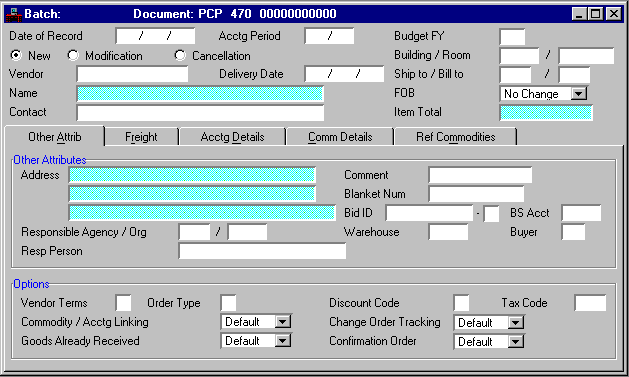
Other Attributes
|
|
Address
|
Display only. The vendor address is inferred from Vendor (VEN2).
|
|
Comment
|
Optional. Enter any notation you want associated with this order.
|
|
Blanket Num
|
Optional. Enter the number of the blanket agreement with the vendor which governs the terms of this order. This number is used for reporting purposes only.
|
|
Bid ID
|
Optional. Enter the number and suffix corresponding to the bid for the order. This field is used in conjunction with
Vendor
to look up the record on Bid Tracking Header (BIDH) so that the system can bring the delivery date and freight on board point to this order.
|
|
BS Acct
|
Optional. Enter if
Consumption Method
is selected [
Y
] on Warehouse Management (WHS2) or if this document concerns a fixed asset commodity. See Balance Sheet Account Index (BACC) for valid values.
|
|
Responsible Agency/Org
|
Responsible Agency
defaults to the agency entering the transaction. Enter the agency that is requesting this order. See Agency Index (AGCY) for valid values.
Responsible Organization
is required. Enter organization within the responsible agency. See Organization Index (ORGN) for valid values.
|
|
Warehouse
|
Optional. Enter the warehouse where goods on this order are shipped. See Warehouse Management Index (WHSE) for valid values. This field is used by the Inventory Control Subsystem to validate the commodity/item combination (stock item) within the warehouse.
|
|
Buyer
|
Optional. Enter the buyer submitting this order. See Buyer (BUYT) for valid values.
|
|
Organization Name
|
Display only. The name of the responsible organization is inferred from Organization (ORG2).
|
|
Resp Person
|
Enter the person to whom you want questions addressed about the order.
|
|
Options
|
|
Vendor Terms
|
Optional. Enter the discount type associated with vendor terms for payment. A valid value will have the
PO Discount Flag
set to
N
on Discount Type (DISC).
|
|
Order Type
|
Optional. Enter
S
(shipping) if you want shipping or special instructions, as entered in Special Instruction (SPIS), printed on the purchase order that is sent to the vendor. You must enter the special instruction code in
Comment
.
Enter
R
to cancel the purchase order and reopen a referenced requisition. This option is only valid if every line on the Centralized Purchase Order (PC) contains a referenced requisition document.
Other than
S
and
R,
which are reserved as described above, this is a user-defined field. You can use any alphanumeric value to define various types of purchase orders; for example, contract, sub-contract, work order, service order.
|
|
Discount Code
|
Optional. To use this field,
Commodity/Accounting Linking
must be
Yes [Y]
. Enter a valid discount code to apply a percent of discount to this purchase order. This percent applies to all commodity lines that do not contain a discount code or discount amount. A valid value will have the
PO Discount Flag
set to
Y
on Discount Type (DISC).
|
|
Tax Code
|
Default is inferred from Vendor Index (VEND) or EPS System Control Options (ESOP). To use this field,
Commodity/Accounting Linking
must be
Yes [Y]
. Enter the code representing the tax rate used to calculate tax on any lines where line tax codes are not entered or inferred. See Tax Code (TAXT) for valid values.
|
|
Commodity/Acctg Linking
|
Optional. This field defaults to
Yes [Y]
when the
Extended Purchasing
option on System Control Systems (SOP2) is
Installed with Linking [L]
. If you have installed EPS with linking, select
No [N]
to turn off the linking between accounting and commodity lines for this document only. Otherwise, select
Default [blank]
.
If the
Extended Purchasing
option on System Control Systems (SOP2) is
Installed [Y]
, the only valid value for this field is
Default [blank]
.
|
|
Change Order Tracking
|
Conditional. On a new entry, this field is inferred from EPS System Control Options (ESOP) and you cannot override that value. On a modification entry, this field is only used if
Change Order Tracking
is selected [
Y
] on EPS System Control Options (ESOP); otherwise, select
Default [blank]
.
Open Purchase Order Header Inquiry (OPPH) indicates the date of the last modification and the number of modifications made to the order. Select
Yes [Y]
to track this change to this purchase order, or
No [N]
if you do not want to track this modification.
|
|
Goods Already Received
|
Defaults to
Default [blank]
. Select
Yes [Y]
if you have received the goods and want the system to generate a Receiver (RC). The system generates the Receiver (RC) based on the Automatic Document Numbering (ADNT) entry, and schedules it for offline processing. If your site requires approvals for Receiver (RC) documents, you must ensure that the approvals are applied.
|
|
Confirmation Order
|
Defaults to
Default [blank]
. If this is a confirming order, select
Yes [Y]
; otherwise, select
No [N]
or
Default [blank]
.
|
|
|
|
|
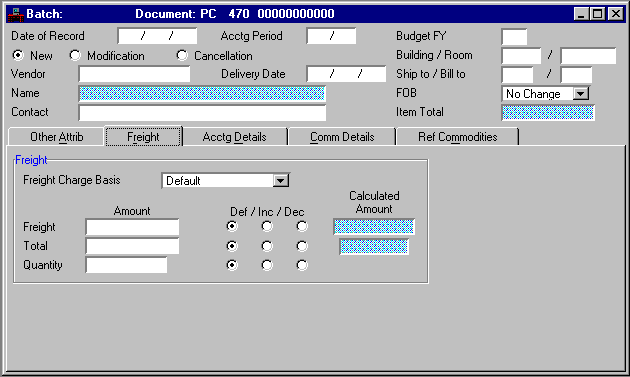
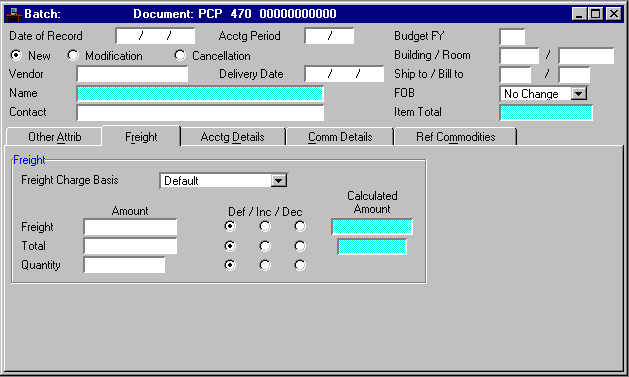
Freight Charge Basis
|
To use this field,
Commodity/Accounting Linking
must be
Yes [Y]
. Select a value to indicate whether or not freight charges influence the total cost of this order and what method the system should use to calculate those charges. Valid values are:
Default [blank]
If this purchase order references another document with a freight indicator value, this field defaults to
By Commodity [C]
. Otherwise, freight is not included on this transaction.
By Quantity [Q]
Prorate the freight total for the current transaction across all commodity lines by quantity.
By Line [D]
Prorate the freight total for the current transaction across all commodity lines by pre-tax amount.
By Commodity [C]
Allow users the option of entering freight on individual commodity lines.
|
|
|
No Freight Allowed [N]
Do not include freight on this transaction or any future document that references this transaction. Freight is not inferred if another document is referenced.
No Change [blank]
If this is a modification transaction, there are no freight charge changes.
|
|
Freight (Amount)
|
Conditional. To use this field,
Commodity/Accounting Linking
must be
Yes [Y]
. If
Freight Charge Basis
is
By Quantity [Q]
or
By Line [D]
, enter the total freight charge for this document; otherwise, leave this field blank.
When the
Freight Charge Basis
is
By Commodity [C]
and this field is blank, the system calculates the freight amount. If you enter a value, regardless of the freight indicator, it must equal the sum of all commodity line freight amounts.
|
|
Freight
(Def/Inc/Dec)
|
Defaults to
Default [blank]
. Required when modifying
Freight Amount
; otherwise, select
Default [blank]
. Select
Decrease [D]
if the freight amount is decreasing or
Increase [I]
if it is increasing.
|
|
Total (Amount)
|
Conditional. Required if
Freight Charge Basis
is
By Line [D]
; leave blank if the freight charge basis is anything else. Enter the total cost of all commodity lines on this document before tax and freight, but after discounts are factored in.
|
|
Total
(Def/Inc/Dec)
|
Defaults to
Default [blank]
. Required when modifying
Total Amount
; otherwise, select
Default [blank]
. Select
Increase [I]
if you are increasing the amount or
Decrease [D]
if you are decreasing the amount.
|
|
Total (Calculated Amount)
|
Display only. The pre-tax, pre-freight, and post-discount total amount for the document is displayed. This field is used to verify that
Total Amount
is correct and is only calculated if
Freight Charge Basis
is
By Line [D]
.
|
|
Quantity (Amount)
|
Conditional. If
Freight Charge Basis
is
By Quantity [Q]
, enter the total quantity for this purchase order; otherwise, leave this field blank.
|
|
Quantity
(Def/Inc/Dec)
|
Defaults to
Default [blank]
. Required when modifying
Quantity Amount
; otherwise, select
Default [blank]
. Select
Decrease [D]
if the quantity amount is decreasing or
Increase [I]
if it is increasing.
|
|
Quantity (Calculated Amount)
|
Display only. The system calculated total quantity for the purchase order is displayed. This field is used to verify that
Quantity Amount
is correct and is only calculated if
Freight Charge Basis
is
By Quantity [Q]
.
|
|
|
|
|
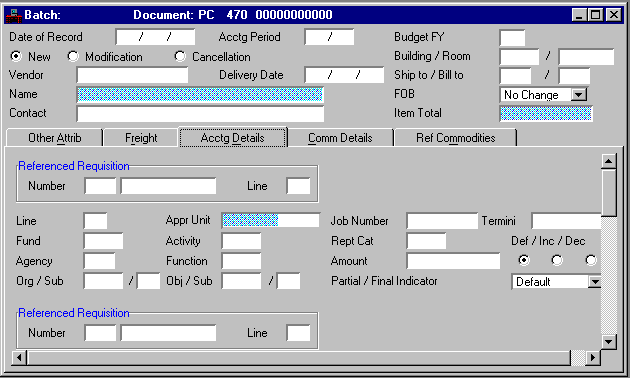
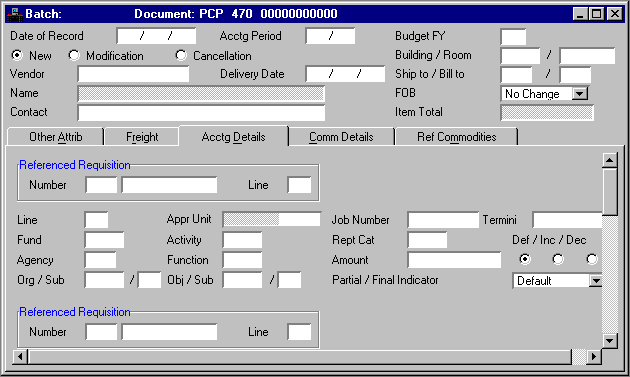
Referenced Requisition
|
|
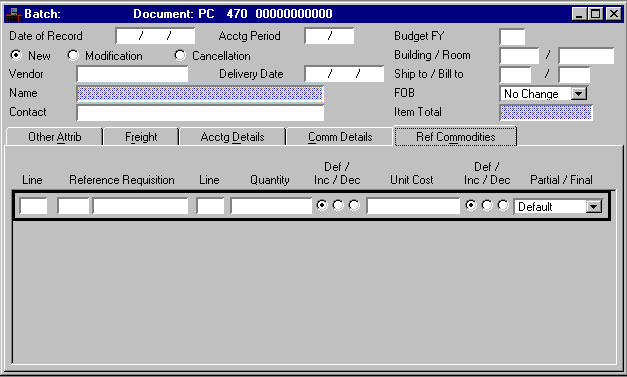
Ref Trans Number
|
Conditional. Required if this purchase order concerns items previously recorded on a requisition; leave blank otherwise. Enter the requisition number of the referenced document.
|
|
Line
|
Conditional. Required if a requisition is referenced. Enter a two-digit number for the line that you are referencing.
|
|
Line
|
Required. Enter a different number for each line on the document. Numbers from
01
to
99
are valid as line numbers. This number is used later on either a payment voucher or manual warrant document to reference this purchase order line.
|
|
Fund
|
Required. Default is inferred from Organization (ORG2) based on the agency and organization entered on this document. See Fund Index (FUND) for valid values.
|
|
Agency
|
Required. Enter the agency purchasing the item named on this line. See Agency Index (AGCY) and Fund Agency Index (FAGY) for valid values.
|
|
Org/Sub
|
Conditional.
Organization
is required if
Expense Budget Organization Option
on Fund Agency Index (FAGY) is
Y
(required on budget and accounting) or
A
(required on accounting); otherwise, it is used for reporting purposes only. Enter the organization purchasing the item named on this line. See Organization Index (ORGN) for valid values.
Sub-Organization
is required if
Sub-Organization Required On Spending
on Organization (ORG2) is:
Required [Y],
Required on Encumbrance Transactions [2], or
Required on Expenditure Transactions [3].
Otherwise, this field is optional. Enter the sub-organization purchasing the item named on this line. See Sub-Organization (SORG) for valid values. You must enter an organization before you can enter a sub-organization.
|
|
Appr Unit
|
Required if the
Appropriation Control Option
is
C
(full control) or
P
(presence control) on Fund Index (FUND). Enter the program budget which will be charged for the items in this accounting line. Refer to Program Reference Table (PRFT) for valid values.
|
|
Activity
|
Conditional. Default is inferred from Organization (ORG2). Required if the
Expense Budget Activity Option
is
Y
(required on budget and accounting) or
A
(required on accounting) on Fund Agency Index (FAGY). Enter the activity related to this purchase order. See Activity Index (ACTV) for valid values.
|
|
Function
|
Conditional. Default is inferred from Organization (ORG2); or from Activity (ACT2), if a function code is not entered on Organization (ORG2). Required if the
Expense Budget Function Option
is
Y
(required on budget and accounting) or
A
(required on accounting) on Fund Agency Index (FAGY). Enter the function code related to this purchase order. See Function (FUNC) for valid values.
|
|
Obj/Sub
|
Object
is conditional. If
Consumption Method
is selected [
Y
] on Warehouse Management (WHS2), this field is optional; otherwise, it is required. Enter the object from Object Index (OBJT) that best describes the item named on this line. You cannot enter a personal services object.
Sub-Object
is required if
Sub-Object Required
is selected [
Y
] on Expense Budget Inquiry (EXP2 or EEX2); otherwise, this field is optional. Enter the sub-object from Sub-Object (SOBJ) that best describes the item named on this line.
|
|
Job Number
|
Conditional. Organizations and activities can be defined to require the entry of a job number. Refer to Organization (ORG2) or Activity (ACT2) for details.
Otherwise, this field is optional. If
Job Cost
is
Yes [Y]
on System Control Options (SOP2), enter a job number. See Job Index (JOBT) for valid values. If
Job Cost
is
No [N]
on System Control Options (SOP2), enter a project number or general reporting category.
|
|
Rept Cat
|
Conditional. Required if
Reporting Category
on Agency (AGC2) is:
Required on Encumbrance Transactions [2], or
Required on Expenditure Transactions [3].
Otherwise, it is optional. See Reporting Category (RPTG) for valid values within the agency.
|
|
Amount
|
Conditional. If linking is turned on, the system automatically calculates this field based on the amounts entered on the commodity lines. If linking is not used, the sum of the accounting lines must equal to sum of the commodity lines. Enter the cost charged to this accounting distribution.
|
|
Def/Inc/Dec
|
Defaults to
Default [blank]
. Required when modifying
Amount
; otherwise, select
Default [blank]
. Select
Increase [I]
if you are increasing the amount or
Decrease [D]
if you are decreasing the amount.
|
|
Partial/Final Indicator
|
Defaults to
Default [blank]
. If referencing a requisition, select
Partial [P]
if this order partially fills the item ordered on the requisition line. Select
Final [F]
for a final order or if you want to close the referenced requisition line.
|
|
Termini
|
Conditional. Required if Termini Validation Indicator is selected on Agency Project (AGPR) for this project. Enter the the mile point, range of mile points, or bridge identifier at which work is performed for a given Highway Route. See Termini Reference Table (TERM) for valid values.
|
|
|
|
|
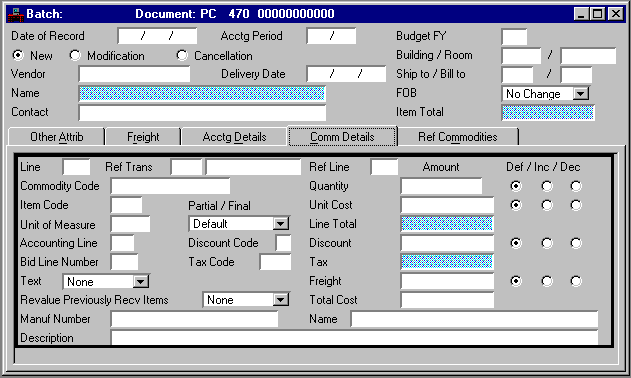
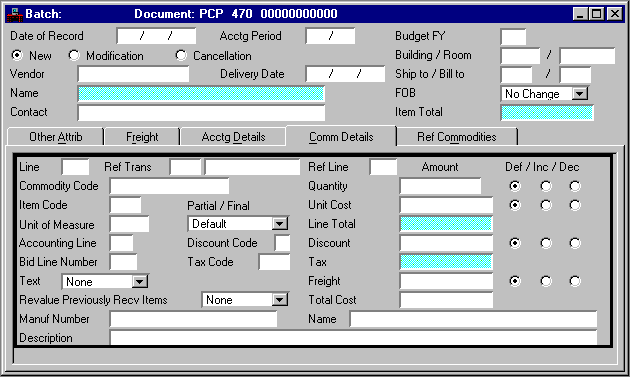
Line
|
Required. Enter a three-digit commodity line number. Valid values are
000
-
999
.
|
|
Ref Trans
|
Conditional. Required if this document concerns commodities previously recorded on a requisition; otherwise, leave blank. Enter the transaction code and document number of the requisition being referenced.
|
|
Ref Line
|
Conditional. Required if a requisition is referenced in
Reference Transaction
; otherwise, leave blank. Enter the commodity line number you want to reference on the requisition.
|
|
Commodity Code
|
Required. Enter the commodity code that identifies the goods or services ordered. See Commodity Index (COMM) for valid values.
|
|
Item Code
|
Optional. Enter a user-defined code to identify the item ordered. Used by the Inventory Control Subsystem to identify a commodity/item combination (stock item) in the warehouse. See Inventory (INV3) for valid item/commodity combinations.
|
|
Unit of Measure
|
Required. Enter the unit of measure for the ordered goods; for example, box, each, dozen. See Unit of Measure (UNIT) for valid values.
|
|
Partial/Final
|
Defaults to
Default [blank]
. If referencing a requisition, select
Partial [P]
if this order partially fills the item ordered on the requisition line. Select
Final [F]
for a final order or if you want to close the referenced requisition line.
|
|
Accounting Line
|
Defaults to
01
if linking is turned on; if linking is not used on this document, leave blank. Enter a valid accounting line number to associate this commodity line with an accounting line.
|
|
Discount Code
|
Optional. To use this field, linking must be turned on. Enter a discount code to apply a percent of discount to just this commodity line. A valid value will have
PO Discount Flag
set to
Y
on Discount Type (DISC). This value overrides
Discount Code
(on the
Other Attributes View
).
|
|
Bid Line Number
|
Optional. Enter the line number of the bid for this order line.
|
|
Tax Code
|
To use this field, linking must be turned on. Enter the code representing the tax rate used for only this line. See Tax Code (TAXT) for valid values. The tax type must match the tax type of the code used in
Tax Code
(on the
Other Attributes View
) and all other line tax codes.
|
|
Text
|
Defaults to
None [blank]
. If you want to associate additional text with this transaction, select the appropriate text type, place your cursor in any field on the line, then select
Additional Description
. The text window associated with the document type displays. Enter the additional description text, then select
Modify:Add
.
Valid values for this field are:
Standard [S]
The text entered on Standard Specification (STDS) for this commodity is used.
Reference [R]
The
Text
indicator on the requisition referenced on this commodity line determines the text associated with this purchase order.
Custom [Y]
The text entered on Purchasing Text (PTEX) is used. Select
Additional Description
to leaf to the Purchasing Text (PTEX) entry for this transaction.
No Change [blank]
|
|
Revalue Previously Recv Items
|
Defaults to
None [blank]
. Select
Yes [Y]
if you want to revalue previously received goods at the revised unit cost.
|
|
Manuf Number
|
Optional. Enter the number of the manufacturer for this commodity code.
|
|
Description
|
Optional. Defaults to description on Commodity (COMT). Enter a description of this line.
|
|
Quantity
|
Required. Enter the quantity of units being purchased.
|
|
Def/Inc/Dec
|
Defaults to
Default [blank]
. Required when modifying the
Quantity
; otherwise, select
Default [blank]
. Select
Increase [I]
if you are increasing the amount or
Decrease [D]
if you are decreasing the amount.
|
|
Unit Cost
|
Required. Enter the cost per unit of the goods ordered, up to six decimal points. A whole number defaults to six decimal places.
|
|
Def/Inc/Dec
|
Defaults to
Default [blank]
. Required when modifying the
Unit Cost
; otherwise, select
Default [blank]
. Select
Increase [I]
if you are increasing the amount or
Decrease [D]
if you are decreasing the amount.
|
|
Line Total
|
Display only. The cost for the commodity line before any discounts, taxes, or freight charges are factored in is displayed. This amount is calculated by the system by multiplying the quantity for this line by the unit cost.
|
|
Discount
|
To use this field, linking must be turned on. If you have entered
Discount Code
(on the
Other Attributes View
or the
Commodity Details View
), this field is calculated by the system.
If you enter this field and
Discount Code
is entered, this amount must equal the amount calculated by the system.
|
|
Def/Inc/Dec
|
Default is
Default [blank]
. Required if modifying
Discount
; otherwise, select
Default [blank]
. Select
Increase [I]
if the amount is increasing or
Decrease [D]
if the amount is decreasing.
|
|
Tax
|
Display only. If linking is turned on, the system calculates the tax amount for this line from quantity, discounted unit cost, and the tax rate associated with the tax code applied to this line.
|
|
Freight
|
Conditional. To use this field, linking must be turned on. If
Freight Charge Basis
is
By Quantity [Q]
or
By Line [D]
, enter the total freight charge for this document; otherwise, leave this field blank.
When the
Freight Charge Basis
is
By Commodity [C]
and this field is blank, the system calculates the freight amount. If you enter a value, regardless of the freight indicator, it must equal the sum of all commodity line freight amounts.
|
|
Def/Inc/Dec
|
Defaults to
Default [blank]
. Required when modifying
Freight
; otherwise, select
Default [blank]
. Select
Increase [I]
if the amount is increasing or
Decrease [D]
if the amount is decreasing.
|
|
Total Cost
|
Optional. The total cost is calculated by multiplying discounted unit cost by quantity plus the tax amount and freight charges.
|
|
Name
|
Optional. Enter the name of the manufacturer for this commodity.
|
|
|
|
|
Date of Record
|
Defaults to date that the system accepts the document. Enter the date (
mm dd yy
) that you want to associate with the transactions, usually the current date. Future dates are not valid.
|
|
Acctg Period
|
Default is inferred from
Date of Record
. If you want this transaction recorded in another accounting period, enter the desired open period (
mm yy
). The only valid future period is the first period of the future year.
|
|
Budget FY
|
Default is the current fiscal year. If you want this transaction recorded in another budget year, enter the desired open year.
|
|
New/Modification/Cancellation [Action]
|
Defaults to
New [E]
. Valid values are:
New [E]
This is a new document (new entry).
Modification [M]
This document is modifying a previously entered document.
Modification [M]
allows you to add lines, change the amounts of existing lines (but not the codes), or cancel a line (decrease a line amount to zero). On a modification transaction, all codes must match the original document.
Cancellation [X]
This document is canceling an existing document. You cannot have referenced the document you want canceled in any way; for example, a Receiver (RC) or Vendor Invoice (VI).
-
To change codes for an existing line, you must cancel the existing line and enter a new line. You can record both these lines on the same document by selecting
Modification [M]
.
|
|
Building/Room
|
Optional
. Enter the building and room number to which the order is delivered.
|
|
Vendor
|
Required. Enter the vendor with whom this purchase order is placed. You cannot enter a miscellaneous vendor on this document. See Vendor Index (VEND) for valid values.
|
|
Delivery Date
|
Default is the current date. Enter the date (
mm dd yy)
when you must receive the order.
|
|
Ship to/Bill to
|
Ship to
is required. Enter the code that represents the receiving location. See Shipping Address (SHIP) for valid values.
Bill to
is required. Enter the code that represents the billing location. See Billing Address (BILL) for valid values.
|
|
Name
|
Display only. The name of the vendor is inferred from Vendor (VEN2).
|
|
FOB
|
Required. Select
Destination [D]
or
Shipping [S]
to designate the freight on board point for a new transaction. Select
Destination [D]
,
Shipping [S]
, or
No Change [blank]
on a modification transaction.
|
|
Contact
|
Defaults to the vendor contact listed on Vendor (VEN2). Enter the name of an individual representing the vendor.
|
|
Item Total
|
Display only. The field displays the net total cost of all the commodity lines entered on this document.
|
|
|
|
|
Other Attributes
|
|
Address
|
Display only The vendor address is inferred from Vendor (VEN2).
|
|
Comment
|
Optional. Enter any notation you want associated with this order.
|
|
Blanket Num
|
Optional. Enter the number of the blanket agreement with the vendor which governs the terms of this order. This number is used for reporting purposes only.
|
|
Bid ID
|
Optional. Enter the number and suffix corresponding to the bid for the order. This field is used in conjunction with
Vendor
to look up the record on Bid Tracking Header (BIDH) so that the system can bring the delivery date and freight on board point to this order.
|
|
BS Acct
|
Optional. Enter if
Consumption Method
is selected [
Y
] on Warehouse Management (WHS2) or if this document concerns a fixed asset commodity. See Balance Sheet Account Index (BACC) for valid values.
|
|
Responsible Agency/Org
|
Responsible Agency
defaults to the agency entering the transaction. Enter the agency that is requesting this order. See Agency Index (AGCY) for valid values.
Responsible Organization
is required. Enter organization within the responsible agency. See Organization Index (ORGN) for valid values.
|
|
Warehouse
|
Optional. Enter the warehouse where goods on this order are shipped. See Warehouse Management Index (WHSE) for valid values. This field is used by the Inventory Control Subsystem to validate the commodity/item combination (stock item) within the warehouse.
|
|
Buyer
|
Optional. Enter the buyer submitting this order. See Buyer (BUYT) for valid values.
|
|
Organization Name
|
Display only. The name of the responsible organization is inferred from Organization (ORG2).
|
|
Resp Person
|
Required. Enter the person to whom you want questions addressed about the order.
|
|
Options
|
|
Vendor Terms
|
Optional. Enter the discount type associated with vendor terms for payment. A valid value will have the
PO Discount Flag
set to
N
on Discount Type (DISC).
|
|
Order Type
|
Optional. Enter
S
(shipping) if you want shipping or special instructions, as entered in Special Instruction (SPIS), printed on the purchase order that is sent to the vendor. You must enter the special instruction code in
Comment
.
Enter
R
to cancel the purchase order and reopen a referenced requisition. This option is only valid if every line on the Centralized Purchase Order (PC) contains a referenced requisition document.
Other than
S
and
R,
which are reserved as described above, this is a user-defined field. You can use any alphanumeric value to define various types of purchase orders; for example, contract, sub-contract, work order, service order.
|
|
Discount Code
|
Optional. To use this field,
Commodity/Accounting Linking
must be
Yes [Y]
. Enter a valid discount code to apply a percent of discount to this purchase order. This percent applies to all commodity lines that do not contain a discount code or discount amount. A valid value will have the
PO Discount Flag
set to
Y
on Discount Type (DISC).
|
|
Tax Code
|
Default is inferred from Vendor Index (VEND) or EPS System Control Options (ESOP). To use this field,
Commodity/Accounting Linking
must be
Yes [Y]
. Enter the code representing the tax rate used to calculate tax on any lines where line tax codes are not entered or inferred. See Tax Code (TAXT) for valid values.
|
|
Commodity/Acctg Linking
|
Optional. This field defaults to
Yes [Y]
when the
Extended Purchasing
option on System Control Systems (SOP2) is
Installed with Linking [L]
. If you have installed EPS with linking, select
No [N]
to turn off the linking between accounting and commodity lines for this document only. Otherwise, select
Default [blank]
.
If the
Extended Purchasing
option on System Control Systems (SOP2) is
Installed [Y]
, the only valid value for this field is
Default [blank]
.
|
|
Change Order Tracking
|
Conditional. On a new entry, this field is inferred from EPS System Control Options (ESOP) and you cannot override that value. On a modification entry, this field is only used if
Change Order Tracking
is selected [
Y
] on EPS System Control Options (ESOP); otherwise, select
Default [blank]
.
Open Purchase Order Header Inquiry (OPPH) indicates the date of the last modification and the number of modifications made to the order. Select
Yes [Y]
to track this change to this purchase order, or
No [N]
if you do not want to track this modification.
|
|
Goods Already Received
|
Defaults to
Default [blank]
. Select
Yes [Y]
if you have received the goods and want the system to generate a Receiver (RC). The system generates the Receiver (RC) based on the Automatic Document Numbering (ADNT) entry, and schedules it for offline processing. If your site requires approvals for Receiver (RC) documents, you must ensure that the approvals are applied.
|
|
Confirmation Order
|
Defaults to
Default [blank]
. If this is a confirming order, select
Yes [Y]
; otherwise, select
No [N]
or
Default [blank]
.
|
|
|
|
|
Freight Charge Basis
|
To use this field,
Commodity/Accounting Linking
must be
Yes [Y]
. Select a value to indicate whether or not freight charges influence the total cost of this order and what method the system should use to calculate those charges. Valid values are:
Default [blank]
If this purchase order references another document with a freight indicator value, this field defaults to
By Commodity [C]
. Otherwise, freight is not included on this transaction.
By Quantity [Q]
Prorate the freight total for the current transaction across all commodity lines by quantity.
By Line [D]
Prorate the freight total for the current transaction across all commodity lines by pre-tax amount.
By Commodity [C]
Allow users the option of entering freight on individual commodity lines.
|
|
|
No Freight Allowed [N]
Do not include freight on this transaction or any future document that references this transaction. Freight is not inferred if another document is referenced.
No Change [blank]
If this is a modification transaction, there are no freight charge changes.
|
|
Freight (Amount)
|
Conditional. To use this field,
Commodity/Accounting Linking
must be
Yes [Y]
. If
Freight Charge Basis
is
By Quantity [Q]
or
By Line [D]
, enter the total freight charge for this document; otherwise, leave this field blank.
When the
Freight Charge Basis
is
By Commodity [C]
and this field is blank, the system calculates the freight amount. If you enter a value, regardless of the freight indicator, it must equal the sum of all commodity line freight amounts.
|
|
Freight
(Def/Inc/Dec)
|
Defaults to
Default [blank]
. Required when modifying
Freight Amount
; otherwise, select
Default [blank]
. Select
Decrease [D]
if the freight amount is decreasing or
Increase [I]
if it is increasing.
|
|
Total (Amount)
|
Conditional. Required if
Freight Charge Basis
is
By Line [D]
; leave blank if the freight charge basis is anything else. Enter the total cost of all commodity lines on this document before tax and freight, but after discounts are factored in.
|
|
Total
(Def/Inc/Dec)
|
Defaults to
Default [blank]
. Required when modifying
Total Amount
; otherwise, select
Default [blank]
. Select
Increase [I]
if you are increasing the amount or
Decrease [D]
if you are decreasing the amount.
|
|
Total (Calculated Amount)
|
Display only. The pre-tax, pre-freight, and post-discount total amount for the document is displayed. This field is used to verify that
Total Amount
is correct and is only calculated if
Freight Charge Basis
is
By Line [D]
.
|
|
Quantity (Amount)
|
Conditional. If
Freight Charge Basis
is
By Quantity [Q]
, enter the total quantity for this purchase order; otherwise, leave this field blank.
|
|
Quantity
(Def/Inc/Dec)
|
Defaults to
Default [blank]
. Required when modifying
Quantity Amount
; otherwise, select
Default [blank]
. Select
Decrease [D]
if the quantity amount is decreasing or
Increase [I]
if it is increasing.
|
|
Quantity (Calculated Amount)
|
Display only. The system calculated total quantity for the purchase order is displayed. This field is used to verify that
Quantity Amount
is correct and is only calculated if
Freight Charge Basis
is
By Quantity [Q]
.
|
|
|
|
|
Referenced Requisition
|
|
Ref Trans Number
|
Conditional. Required if this purchase order concerns items previously recorded on a requisition; leave blank otherwise. Enter the requisition number of the referenced document.
|
|
Line
|
Conditional. Required if a requisition is referenced. Enter a two-digit number for the line that you are referencing.
|
|
Line
|
Required. Enter a different number for each line on the document. Numbers from
01
to
99
are valid as line numbers. This number is used later on either a payment voucher or manual warrant document to reference this purchase order line.
|
|
Fund
|
Required. Default is inferred from Organization (ORG2) based on the agency and organization entered on this document. See Fund Index (FUND) for valid values.
|
|
Agency
|
Required. Enter the agency purchasing the item named on this line. See Agency Index (AGCY) and Fund Agency Index (FAGY) for valid values.
|
|
Org/Sub
|
Conditional.
Organization
is required if
Expense Budget Organization Option
on Fund Agency Index (FAGY) is
Y
(required on budget and accounting) or
A
(required on accounting); otherwise, it is used for reporting purposes only. Enter the organization purchasing the item named on this line. See Organization Index (ORGN) for valid values.
Sub-Organization
is required if
Sub-Organization Required On Spending
on Organization (ORG2) is:
Required [Y],
Required on Encumbrance Transactions [2], or
Required on Expenditure Transactions [3].
Otherwise, this field is optional. Enter the sub-organization purchasing the item named on this line. See Sub-Organization (SORG) for valid values. You must enter an organization before you can enter a sub-organization.
|
|
Appr Unit
|
Required if the
Appropriation Control Option
is
C
(full control) or
P
(presence control) on Fund Index (FUND). Enter the program budget which will be charged for the items in this accounting line. Refer to Program Reference Table (PRFT) for valid values.
|
|
Activity
|
Conditional. Default is inferred from Organization (ORG2). Required if the
Expense Budget Activity Option
is
Y
(required on budget and accounting) or
A
(required on accounting) on Fund Agency Index (FAGY). Enter the activity related to this purchase order. See Activity Index (ACTV) for valid values.
|
|
Function
|
Conditional. Default is inferred from Organization (ORG2); or from Activity (ACT2), if a function code is not entered on Organization (ORG2). Required if the
Expense Budget Function Option
is
Y
(required on budget and accounting) or
A
(required on accounting) on Fund Agency Index (FAGY). Enter the function code related to this purchase order. See Function (FUNC) for valid values.
|
|
Obj/Sub
|
Object
is conditional. If
Consumption Method
is selected [
Y
] on Warehouse Management (WHS2), this field is optional; otherwise, it is required. Enter the object from Object Index (OBJT) that best describes the item named on this line. You cannot enter a personal services object.
Sub-Object
is required if
Sub-Object Required
is selected [
Y
] on Expense Budget Inquiry (EXP2 or EEX2); otherwise, this field is optional. Enter the sub-object from Sub-Object (SOBJ) that best describes the item named on this line.
|
|
Job Number
|
Conditional. Organizations and activities can be defined to require the entry of a job number. Refer to Organization (ORG2) or Activity (ACT2) for details.
Otherwise, this field is optional. If
Job Cost
is
Yes [Y]
on System Control Options (SOP2), enter a job number. See Job Index (JOBT) for valid values. If
Job Cost
is
No [N]
on System Control Options (SOP2), enter a project number or general reporting category.
|
|
Rept Cat
|
Conditional. Required if
Reporting Category
on Agency (AGC2) is:
Required on Encumbrance Transactions [2], or
Required on Expenditure Transactions [3].
Otherwise, it is optional. See Reporting Category (RPTG) for valid values within the agency.
|
|
Amount
|
Conditional. If linking is turned on, the system automatically calculates this field based on the amounts entered on the commodity lines. If linking is not used, the sum of the accounting lines must equal to sum of the commodity lines. Enter the cost charged to this accounting distribution.
|
|
Def/Inc/Dec
|
Defaults to
Default [blank]
. Required when modifying
Amount
; otherwise, select
Default [blank]
. Select
Increase [I]
if you are increasing the amount or
Decrease [D]
if you are decreasing the amount.
|
|
Partial/Final Indicator
|
Defaults to
Default [blank]
. If referencing a requisition, select
Partial [P]
if this order partially fills the item ordered on the requisition line. Select
Final [F]
for a final order or if you want to close the referenced requisition line.
|
|
Termini
|
Conditional. Required if Termini Validation Indicator is selected on Agency Project (AGPR) for this project. Enter the the mile point, range of mile points, or bridge identifier at which work is performed for a given Highway Route. See Termini Reference Table (TERM) for valid values.
|
|
|
|
|
Line
|
Required. Enter a two-digit commodity line number. Valid values are
000
-
999
.
|
|
Ref Trans
|
Conditional. Required if this document concerns commodities previously recorded on a requisition; otherwise, leave blank. Enter the transaction code and document number of the requisition being referenced.
|
|
Ref Line
|
Conditional. Required if a requisition is referenced in
Reference Transaction
; otherwise, leave blank. Enter the commodity line number you want to reference on the requisition.
|
|
Commodity Code
|
Required. Enter the commodity code that identifies the goods or services ordered. See Commodity Index (COMM) for valid values.
|
|
Item Code
|
Optional. Enter a user-defined code to identify the item ordered. Used by the Inventory Control Subsystem to identify a commodity/item combination (stock item) in the warehouse. See Inventory (INV3) for valid item/commodity combinations.
|
|
Unit of Measure
|
Required. Enter the unit of measure for the ordered goods; for example, box, each, dozen. See Unit of Measure (UNIT) for valid values.
|
|
Partial/Final
|
Defaults to
Default [blank]
. If referencing a requisition, select
Partial [P]
if this order partially fills the item ordered on the requisition line. Select
Final [F]
for a final order or if you want to close the referenced requisition line.
|
|
Accounting Line
|
Defaults to
01
if linking is turned on; if linking is not used on this document, leave blank. Enter a valid accounting line number to associate this commodity line with an accounting line.
|
|
Discount Code
|
Optional. To use this field, linking must be turned on. Enter a discount code to apply a percent of discount to just this commodity line. A valid value will have
PO Discount Flag
set to
Y
on Discount Type (DISC). This value overrides
Discount Code
(on the
Other Attributes View
).
|
|
Bid Line Number
|
Optional. Enter the line number of the bid for this order line.
|
|
Tax Code
|
To use this field, linking must be turned on. Enter the code representing the tax rate used for only this line. See Tax Code (TAXT) for valid values. The tax type must match the tax type of the code used in
Tax Code
(on the
Other Attributes View
) and all other line tax codes.
|
|
Text
|
Defaults to
None [blank]
. If you want to associate additional text with this transaction, select the appropriate text type, place your cursor in any field on the line, then select
Additional Description
. The text window associated with the document type displays. Enter the additional description text, then select
Modify:Add
.
Valid values for this field are:
Standard [S]
The text entered on Standard Specification (STDS) for this commodity is used.
Reference [R]
The
Text
indicator on the requisition referenced on this commodity line determines the text associated with this purchase order.
Custom [Y]
The text entered on Purchasing Text (PTEX) is used. Select
Additional Description
to leaf to the Purchasing Text (PTEX) entry for this transaction.
No Change [blank]
|
|
Revalue Previously Recv Items
|
Defaults to
None [blank]
. Select
Yes [Y]
if you want to revalue previously received goods at the revised unit cost.
|
|
Manuf Number
|
Optional. Enter the number of the manufacturer for this commodity code.
|
|
Description
|
Optional. Defaults to description on Commodity (COMT). Enter a description of this line.
|
|
Quantity
|
Required. Enter the quantity of units being purchased.
|
|
Def/Inc/Dec
|
Defaults to
Default [blank]
. Required when modifying the
Quantity
; otherwise, select
Default [blank]
. Select
Increase [I]
if you are increasing the amount or
Decrease [D]
if you are decreasing the amount.
|
|
Unit Cost
|
Required. Enter the cost per unit of the goods ordered, up to six decimal points. A whole number defaults to six decimal places.
|
|
Def/Inc/Dec
|
Defaults to
Default [blank]
. Required when modifying the
Unit Cost
; otherwise, select
Default [blank]
. Select
Increase [I]
if you are increasing the amount or
Decrease [D]
if you are decreasing the amount.
|
|
Line Total
|
Display only. The cost for the commodity line before any discounts, taxes, or freight charges are factored in is displayed. This amount is calculated by the system by multiplying the quantity for this line by the unit cost.
|
|
Discount
|
To use this field, linking must be turned on. If you have entered
Discount Code
(on the
Other Attributes View
or the
Commodity Details View
), this field is calculated by the system.
If you enter this field and
Discount Code
is entered, this amount must equal the amount calculated by the system.
|
|
Def/Inc/Dec
|
Default is
Default [blank]
. Required if modifying
Discount
; otherwise, select
Default [blank]
. Select
Increase [I]
if the amount is increasing or
Decrease [D]
if the amount is decreasing.
|
|
Tax
|
Display only. If linking is turned on, the system calculates the tax amount for this line from quantity, discounted unit cost, and the tax rate associated with the tax code applied to this line.
|
|
Freight
|
Conditional. To use this field, linking must be turned on. If
Freight Charge Basis
is
By Quantity [Q]
or
By Line [D]
, enter the total freight charge for this document; otherwise, leave this field blank.
When the
Freight Charge Basis
is
By Commodity [C]
and this field is blank, the system calculates the freight amount. If you enter a value, regardless of the freight indicator, it must equal the sum of all commodity line freight amounts.
|
|
Def/Inc/Dec
|
Defaults to
Default [blank]
. Required when modifying
Freight
; otherwise, select
Default [blank]
. Select
Increase [I]
if the amount is increasing or
Decrease [D]
if the amount is decreasing.
|
|
Total Cost
|
Optional. The total cost is calculated by multiplying discounted unit cost by quantity plus the tax amount and freight charges.
|
|
Name
|
Optional. Enter the name of the manufacturer for this commodity.
|
|
|
|
|
Date of Record
|
Default is the current date. Enter the date (
mm dd yy
) associated with these records.
|
|
Accounting Period
|
Default is inferred from
Date of Record
. Enter the accounting period (
mm yy
) you want to associate with this record.
|
|
Bank Account Code
|
Required. Enter the bank account that the check or manual warrant was originally drawn against. See Open Check Header Inquiry (OPCH) for valid values.
|
|
Cancellation Type
|
Default is
Reschedule [1]
. Enter the type of cancellation you want applied to this check or manual warrant. Valid values are:
Reschedule [1]
Cancel the check and reschedule the payment voucher.
Unschedule [2]
Cancel the check and put the payment voucher on hold.
Cancel [3]
Cancel the check, leave the payment voucher closed, and record the liability in the cancel voucher payable account established on System Special Accounts (SPEC).
-
The following value cannot be used to cancel a travel document:
Close [4]
Cancel the check and back out the payment voucher; disallow cancellation of a partial payment check.
|
|
Vendor Code
|
Required. Enter the same vendor code used for the check or manual warrant being canceled.
|
|
EFT Ind
|
Default is cleared [
N
]. Select [
Y
]
when the check you want canceled was processed through Electronic Funds Transfer (EFT).
|
|
Check Number
|
Conditional. Required if you are cancelling a check. Enter the number of the check that you want to cancel.
|
|
Manual Warrant Number
|
Conditional. Required if you are cancelling a manual warrant; otherwise, leave blank. Enter the document number of the manual warrant that you want to cancel.
|
|
Travel Check Number
|
Conditional. Required if you are cancelling a Travel Check (TC). Also required if you are cancelling an Automated Disbursement (AD) or Electronic Funds Transfer (EFT) that was created as a result of employee travel; otherwise, leave blank. Enter the transaction code and document number of the check that you want to cancel.
|
|
Scheduled Pay Date
|
Optional. If
Cancellation Type
is
Reschedule [1]
, enter the rescheduled payment date (
mm dd yy
) for the check.
|
|
Cash Account
|
Optional. Used only for manual warrants. If you want to override the account used on the manual warrant, enter the override account. See Balance Sheet Account Index (BACC) for valid values.
|
|
|
|
|
Date of Record
|
Default is the date the system accepts the document. Enter the date (
mm dd yy
) you want to associate with this document, usually the current date.
|
|
Accounting Period
|
Default is inferred from
Date of Record
. Enter the accounting period you want associated with these lines (it must be open). Do not enter a future accounting period .
|
|
New/Modification [Action]
|
Default is
New [E]
. Use
Modification [M]
if you want to reuse a journal voucher number in the same accounting period. This groups the documents together on the Trial Balance by Accounting Distribution (A611) report.
|
|
Override Budget
|
Default is cleared
[N]
. Select
[Y]
to override the pre-approved budgeted amount. For more information, refer to the
User's Guide
.
|
|
Reversal Date
|
Optional. Enter only if you want this journal voucher automatically reversed. Enter the date (
mm dd yy
) when you want the reversal to take place. When this date is entered, the last character of the journal voucher document number must be
E
.
|
|
Comments
|
Optional. Enter a descriptive note about this document.
|
|
Debit Total
|
Required. Enter the total amount of the debit lines on this document. This field must equal
Credit Total
, or the document is rejected.
|
|
Credit Total
|
Required. Enter the total amount of the credit lines on this document. This field must equal
Debit Total
, or the document is rejected.
|
|
Calculated Debit Total
|
Display only. The system automatically calculates the total amount of debit lines on this document. This field must equal
Calculated Credit Total
, or the document is rejected.
|
|
Calculated Credit Total
|
Display only. The system automatically calculates the total amount of credit lines on this document. This field must equal
Calculated Debit Total
, or the document is rejected.
|
|
Cash Debit Total
|
Display only. The system automatically calculates the total of debits for those lines affecting cash control.
|
|
Cash Credit Total
|
Display only. The system automatically calculates the total of credits for those lines affecting cash control.
|
|
Budget FY
|
Default is inferred from
Date of Record
. If you want these lines recorded in another fiscal year, enter the desired fiscal year. Enter an open year that is not a future fiscal year.
|
|
Memo Ref Doc/ Line
|
Optional. Enter the transaction code, agency, and number of the document related to this journal voucher.
|
|
Account Type
|
Conditional. Select the account type associated with this journal voucher transaction. The journal voucher document has multiple uses. For more information on entering this field, refer to the
User's Guide
. Valid values are:
Asset [01]
Liability [02]
Fund Balance [03]
Asset Offset to Expenses [11]
Encumbrance [21]
(only allowed under certain circumstances.)
Expense/Expenditure [22]
Expenditure [23]
Expense [24]
Revenue [31]
|
|
Fund
|
Required. Enter a Fund code valid on FUN2. Default is inferred from Organization (ORG2) based on the agency and organization entered on this document. Enter the fund if you want to override the default. See Fund Index (FUND) for valid values. The Fund code cannot be a Capital Project Fund code.
|
|
Agency
|
Required. Enter the agency used on this journal voucher. See Agency Index (AGCY) for valid values.
|
|
Organization/Sub
|
Required. Enter the organization and sub-organization (if desired) used on this journal voucher. See Organization Index (ORGN) and Sub-Organization (SORG).
|
|
Appropriation Unit
|
Required. Enter the Program Budget Unit element for the items listed on this voucher. See Program Reference Table (PRFT) for valid values. The Appropriation Program element and Allotment Program element will be inferred from PRFT based on Program Budget Unit.
|
|
Activity
|
Conditional. Enter the activity used on this journal voucher. See Activity Index (ACTV) for valid values.
|
|
Function
|
Conditional. Enter the function used on this journal voucher. See Function (FUNC) for valid values.
|
|
Termini
|
Conditional. Required if Termini Validation Indicator is selected on Agency Project (AGPR) for this project. Enter the mile point, range of mile points, or bridge identifier at which work is performed for a given Highway Route. See Termini Reference Table (TERM) for valid values.
|
|
Object/Rev/Sub
|
Conditional. Enter the object and sub-object associated with this journal voucher OR the revenue source and sub-revenue source associated with the journal voucher. See Object Index (OBJT) and Sub-Object (SOBJ) or Revenue Source Index (RSRC) and Sub-Revenue Source (SREV) for valid values.
|
|
BS Account
|
Conditional. Enter the balance sheet account associated with this journal voucher. See Balance Sheet Account Index (BACC) for valid values.
|
|
Job Number
|
Conditional. Enter the job number associated with this journal voucher. See Job Index (JOBT) for valid values.
|
|
Internal Fund
|
Conditional. If clearing out due to accounts, enter the seller's fund. If clearing out due from accounts, enter the buyer's fund. See Fund Index (FUND) for valid values.
|
|
Reference Agency
|
Conditional. If clearing out due to accounts, enter the reference agency for the seller. If clearing out due from accounts, enter the agency for the buyer. See Agency Index (AGCY) for valid values.
|
|
Bank Account Code
|
Conditional. Enter the bank account associated with this journal voucher. See Bank Account (BANK) for valid values.
The journal voucher document has multiple uses. For more information on entering this field, refer to the
User's Guide
.
|
|
Description
|
Optional. Enter a description for this journal voucher line.
|
|
Debit
|
Enter amounts on the debit side if you are reclassifying expenditures, revenue or balance sheet accounts.
|
|
Rept Cat
|
Conditional. Enter the reporting category associated with this journal voucher. See Reporting Category (RPTG) for valid values.
|
|
Vendor/Prov
|
Default is
None [blank]
. Required if
Vendor Name
is
Required [Y]
on System Control Options (SOP2). This field indicates if the value entered in
Code
is valid on Vendor (VEN2) or Provider (PROV). Valid values are:
Vendor [V]
Provider [P]
Quantity [Q]
None [N]
|
|
Code
|
Conditional. Enter the vendor or provider associated with this journal voucher. See Vendor Index (VEND) or Provider (PROV) for valid values.
The journal voucher document has multiple uses. For more information on entering this field, refer to the
User's Guide
.
|
|
Name
|
Default is inferred from Vendor (VEN2) or Provider (PROV) depending on the value in
Code
. Enter the name of the vendor or provider for reference purposes.
The journal voucher document has multiple uses. For more information on entering this field, refer to the
User's Guide
.
|
|
Credit
|
Enter amounts on the credit side if you are reclassifying expenditure, revenue or balance sheet accounts.
|
|
Cash Indicator
|
Conditional. Required if
JV Cash Indicator Required
is
Yes [Y]
on System Control Options (SOP2); otherwise, select
Default [blank]
. Valid values are:
Yes [Y]
This document updates the
Collected
fields on Agency Project Inquiry (AGPR).
No [N]
This document updates the
Accrued
fields on Agency Project Inquiry (AGPR).
|
|
|
|
|
Miscellaneous Customer
|
Default is cleared [
N
]. Select [
Y
] to identify miscellaneous one-time or summary customers.
|
|
Alternate Customer
|
Optional. Enter an alternate identifier for the customer/client.
|
|
Customer Type
|
Optional. Enter the type of customer. Valid values are:
Individual [I]
Incorporated [C]
Partnership [P]
|
|
Short Name
|
Required. Enter the corresponding customer short name.
|
|
Division Name
|
Optional. Enter the corporation division, department or other additional name information.
|
|
Address, City, State, Zip
|
Required. Enter the customer's street address, city, state and zip code. The first five characters of the zip code are required and the last four are optional. Not required if Foreign/Military Address indicator is selected.
|
|
Foreign Military Address
|
If selected [Y], State and Zip Codes not required.
|
|
Phone
|
Optional. Enter the customer's telephone number.
|
|
Fax Phone
|
Optional. Enter the telephone number for the customer's fax machine.
|
|
|
|
|
Date of Birth
|
Optional. Enter the customer's date of birth (
mm dd ccyy
).
|
|
SIC Code
|
Required if Customer Type = C. Enter the standard industry code for this customer.
|
|
Customer Speaks English
|
Optional. Defaults to
No Entry [blank].
Select the appropriate value. Valid values are
Yes [Y]
,
No [N]
, and
No Entry [blank]
.
|
|
Customer Status
|
Default is
Active [A]
. Valid values are
Active [A]
,
Inactive [I]
or
Marked for Deletion [D]
.
|
|
In-State
|
Default [Y]. Select [N] if the customer is not located In-State.
|
|
Project Funding Source
|
Defaults to
No Entry [blank]
. If this customer is associated with a project fund, select
Yes [Y]
. Valid values are
Yes [Y]
,
No [N]
, and
No Entry [blank]
.
|
|
Project Funding Source Type
|
Conditional.
Project Funding Source
must be
Yes [Y]
to enter a value other than
No Entry [blank]
. Select the value that best describes the type of project fund. Valid values are
Federal [F]
,
State [S]
,
Bond [B]
, and
Other [O]
.
|
|
Sex
|
Defaults to
No Entry [blank]
. Valid values are
No Entry [blank]
,
Female [F]
and
Male [M]
.
|
|
Customer is Tax Exempt
|
Defaults to
No Entry [blank]
. Valid values are
Yes [Y]
,
No [N]
, and
No Entry [blank]
.
|
|
Mail Returned
|
Defaults to
No Entry [N]
. Select
Yes [Y]
if the customer's address is no longer valid. Valid values are
Yes [Y]
,
No [N]
, and
No Entry [N]
.
|
|
Marital Status
|
Defaults to
No Entry [blank]
. Valid values are
Single [S]
,
Married [M]
,
Divorced [D]
, or
No Entry [blank]
.
|
|
License/Permit Number
|
Optional. Enter the license or permit number with which the customer is associated.
|
|
|
|
|
ABA Number/ Check Digit
|
Required. Enter the ABA routing number and check digit found on the lower left-hand corner of the customer's check.
|
|
Application Type
|
Optional. Enter a default electronic funds transfer application value. Refer to Electronic Funds Transfer Type (EFTA) for valid values.
|
|
Infer EFT
|
Optional. If you wish to change any EFT information from the customer file, check this box and perform Process:Edit. Then, make the changes.
|
|
Customer Bank Information
|
|
Account #
|
Required. Enter the customer's bank account number from the check.
|
|
Description
|
Optional. Enter the customer's bank account description.
|
|
Name
|
Required. Enter the customer's bank name.
|
|
Address, City, State, Zip Code
|
Required. Enter the street address, city, state, zip code of the customer's bank.
|
|
Checking/Savings [Type of Account]
|
Required. Select
Checking [C]
or
Savings [S]
. This field indicates the type of account to which you want the funds transferred.
|
|
Prenote Batch Number
|
Display only. Displays the batch number of the customer's prenote processing tape that was sent to the bank.
|
|
EFT Status
|
Display only. The customer's electronic funds transfer status is displayed. Valid entries include:
Not Eligible for EFT [N]
Not eligible for electronic funds transfer. Defaults to
Not Eligible for EFT [N]
when the customer is added to the Customer Electronic Funds Transfer window (CEFT).
Active [A]
Currently using electronic funds transfer.
Hold [H]
Electronic funds transfer is on hold for this customer.
Prenote Processing Begun [P]
Prenote processing has begun.
|
|
Last Status Change
|
Display only. Displays the last date the customer's status was changed, either on this window or through prenote processing.
|